Skip to content
LotusPond Health

LotusPond Health For families and for healthcare organisations

Health records, ready for any AI agent.

LotusPond Health works in two directions. Families bring their reports into one record and choose which AI may read it. Healthcare organisations reach hospital systems through one API and one MCP server, instead of one integration per system.

Connect your AI. Claude, ChatGPT, Gemini, Grok, Muse and other agents can read the records you choose.

For people and families · Personal account

Your family’s records, with the AI you choose.

Reports from labs, hospitals, ABHA and your devices, kept for each person in your family. Claude, ChatGPT or any agent reads only what you share.

  • Results, trends and scans for every family member
  • You choose whose records each agent sees
  • Stored in India, never sold, deleted when you ask
For healthcare organisations · Organisation account

One API to reach hospital systems.

Healthcare startups, hospitals and insurers find patients, list visits, attach documents and check claims, in FHIR R4, through one REST API and one MCP server.

  • A sandbox hospital from your first API key
  • Your team, with owner, admin, editor and viewer roles
  • Writes wait for your clinician; every call is logged

The two use separate accounts, so an employer never controls the account that holds your own health records. LotusPond explains results; it does not diagnose.

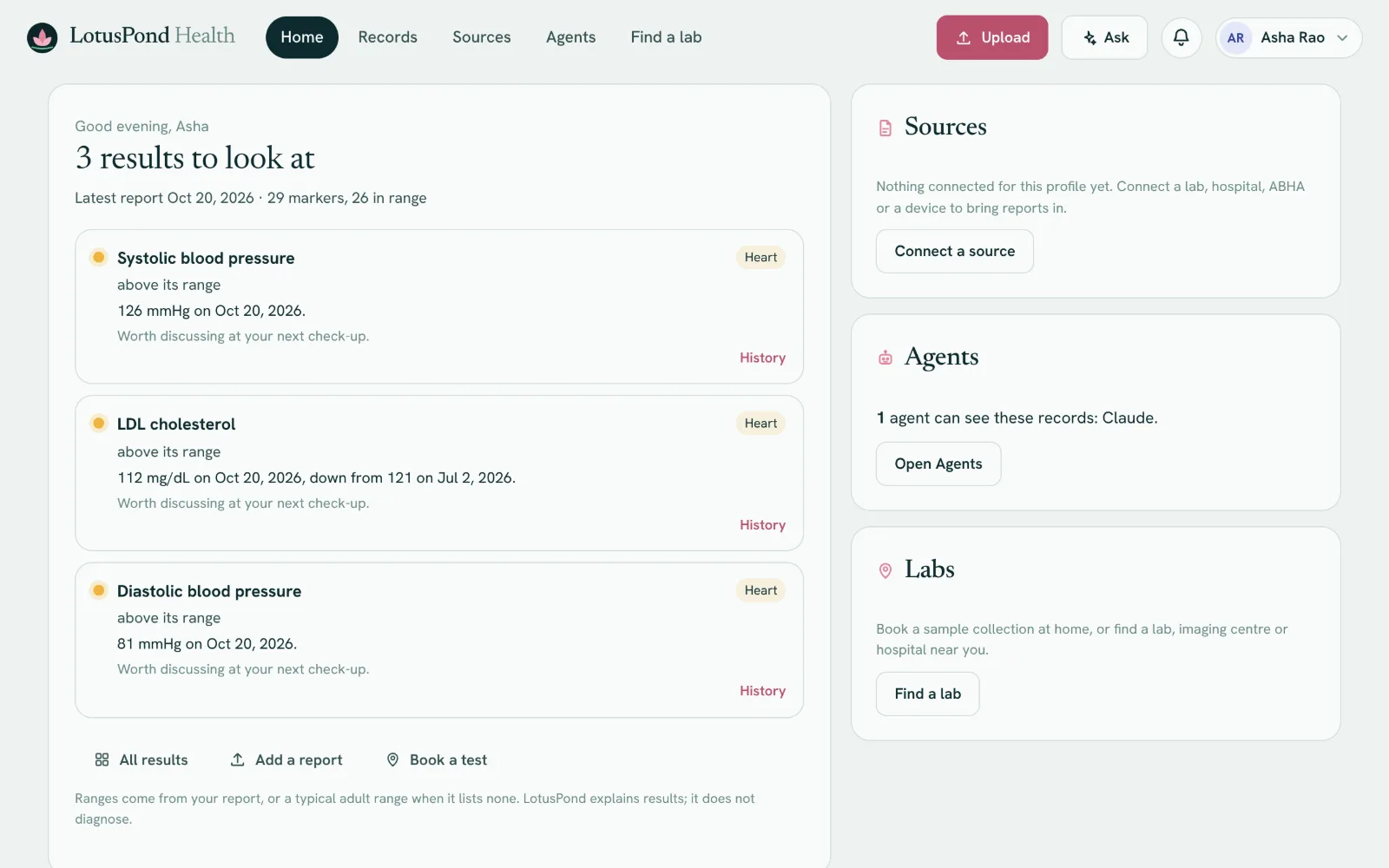
LotusPond Home: three results to look at (blood pressure and LDL cholesterol above their range, with what changed and a note to discuss them at the next check-up), beside cards for Sources, Agents (Claude can see these records) and Labs.
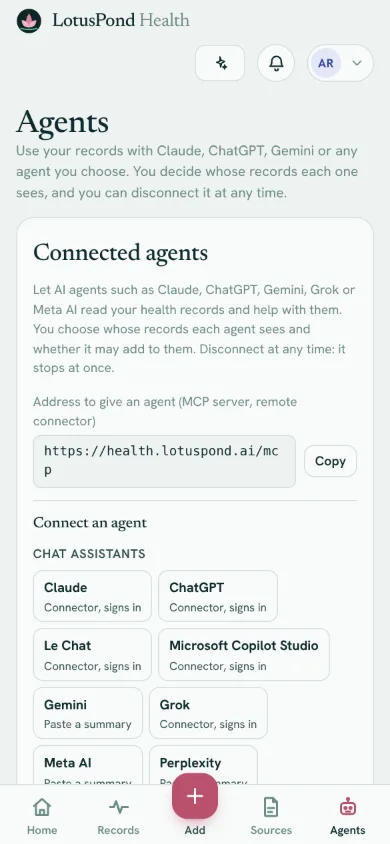
LotusPond on a phone: the Agents page, with the address to give an agent and the assistants you can connect, from Claude and ChatGPT to Gemini and Grok.
For families: Home in a browser, and connecting an agent on a phone, showing sample data.

Ask your own AI about your health.

Connect the assistant you already use. It reads the records you choose (results, trends, conditions and medications) and explains them in your words. You can disconnect it at any time.

  • ClaudeSettings, Connectors, Add custom connector
  • ChatGPTA developer mode connector, on plans that offer one
  • GeminiGemini CLI connects directly; in the Gemini app, paste a summary
  • Grokgrok.com, Connectors, New connector, Custom
  • Grok BotAsk a Bot to add a remote MCP server, with an access token
  • MuseAsk Muse to create a custom connector, with an access token
  • Le ChatA custom MCP connector, on plans that offer one
  • GitHub Copilot in VS CodeMCP: Add Server, then HTTP
  • CursorSettings, MCP, Add new MCP server
  • WindsurfAdd the address to its MCP settings
  • Any MCP clientClaude Code, Codex CLI, Grok Build, Muse Code, Goose, Zed and your own agents
  1. Create your account

    Add your reports, or start with sample data.

  2. Paste one address into your agent

    https://staging.health.lotuspond.ai/mcp
  3. Choose what it may see

    Whose records, which kinds of data, and whether it may add readings. Change or remove it on Account.

Create free account

Account, Connected agents has the steps for each agent, and access tokens for agents that cannot sign in.

Agents see summaries only, never your files or scan images, and they cannot book or pay for anything. Grok Bot, Muse and agents that cannot sign in use an access token made on Account. The Gemini app and Meta AI do not take connectors yet: copy a summary of your records from Account and paste it in. LotusPond is not affiliated with or endorsed by these companies; their names and logos are trademarks of their owners.

Your records, clear and complete.

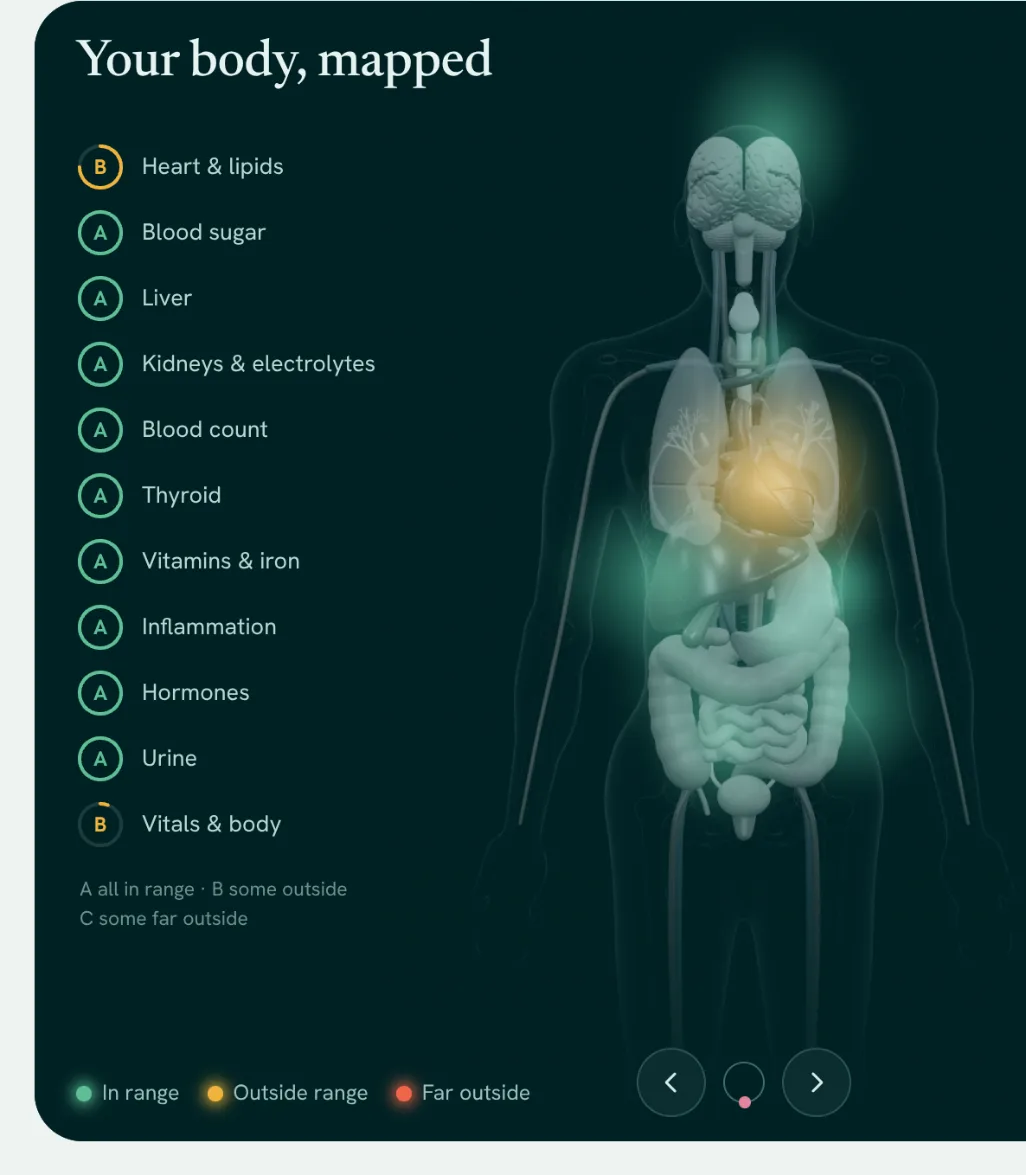
Every report becomes results you can follow over time, for each person in your family, with the original kept. A simple map of the body shows where each result belongs.

The body map: a figure of the body with a soft glow on organs that have results, amber on the heart, beside a grade for each body system, from heart and lipids to vitals.

See where results belong

The body map shows each body system with a grade, and organs glow where results sit outside their range. Open an organ for a close-up and the results that relate to it.

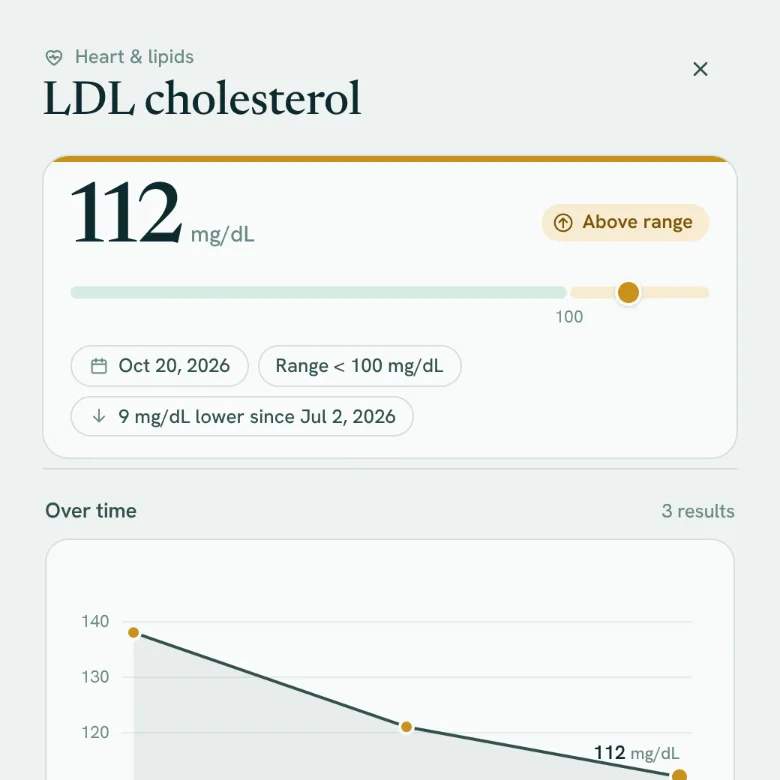
The history of LDL cholesterol: the latest value, its place in the reference range, and a chart of values over time.

Each marker over time

See where a value sits in its reference range and how it has moved across reports, with a short note on what it measures.

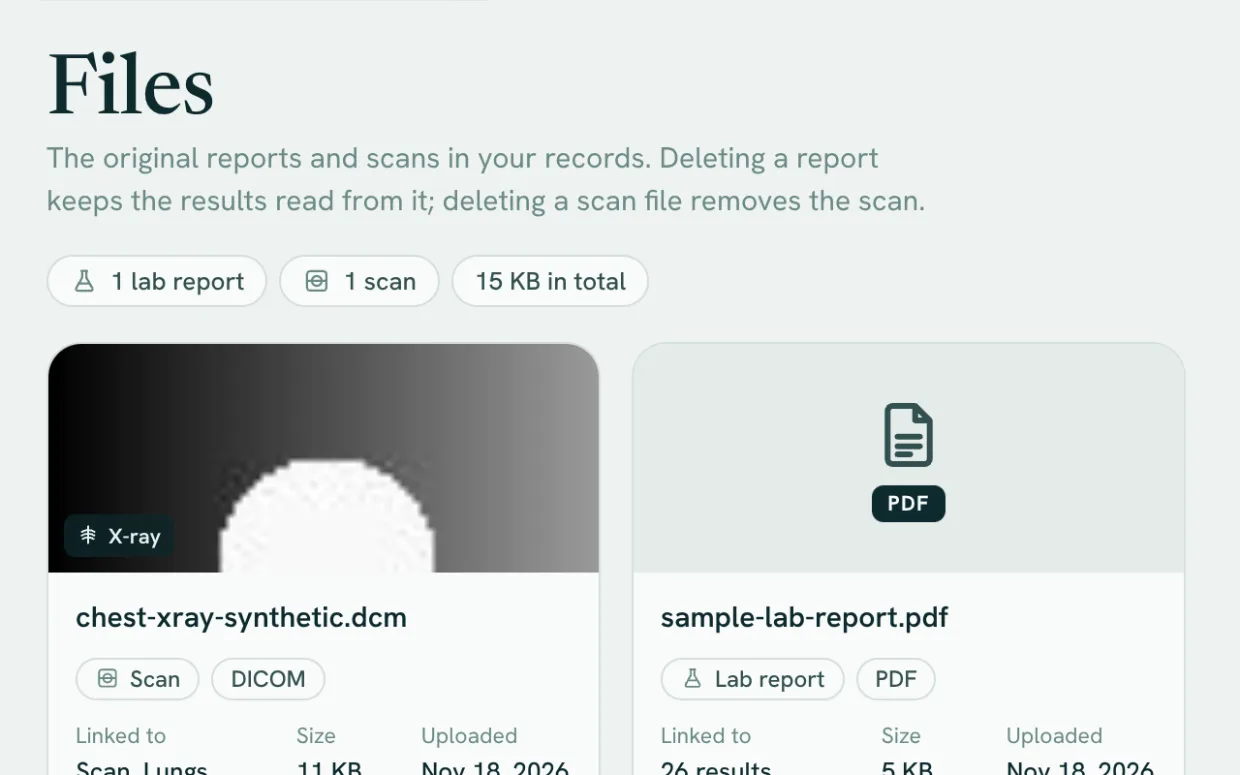
The Files page listing a chest x-ray and a lab report, each with what it is linked to, its size and date, and options to open, download or delete.

Your originals, kept

Every report and scan is stored with the values read from it, ready to open, download or delete.

One account for the whole family

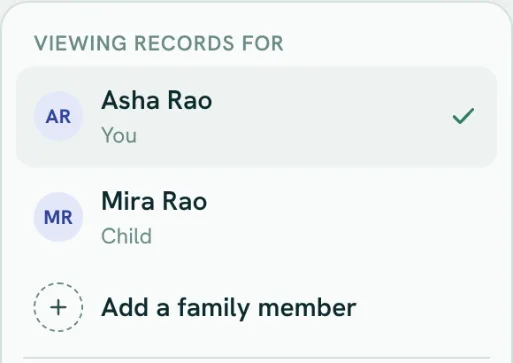
Add a profile for each person you care for, from children to parents. Each person’s records stay separate, and you switch between them from the menu.

The profile menu with two people, Asha Rao and her daughter Mira, and an option to add a family member.

Screens from the app, showing sample data.

It brings in the records you already have.

Connect a lab, hospital, ABHA, DigiLocker or a device, and LotusPond fetches your reports. Or upload a PDF or photo: every value is shown for you to check before it is saved, and the original is kept with your records.

  • Labs and hospitals
  • ABHA and DigiLocker
  • Devices and wearables
  • Reports you upload

Your records, with any agent.

Nothing to install. LotusPond runs in your browser and in the iPhone and Android apps.

  1. Bring in your records

    Connect a lab, hospital, ABHA, DigiLocker or a device, and LotusPond fetches your reports. Or upload a PDF or photo; you check every value before it is saved.

  2. Use them with your AI

    Add LotusPond to Claude, ChatGPT or any agent that speaks MCP, with one address. Ask about your results, add readings, or plan a test.

  3. Stay in control

    Choose whose records each agent sees, which kinds, and for how long. Every agent read and write shows in your activity, and you can disconnect at once.

Find a lab near you.

Enter an area or postcode to see where you can get tested. Partner labs are listed first, starting in India, followed by diagnostic labs, imaging centres and hospitals nearby.

  • Partner labs first. Starting in India, with the tests they offer, home collection and booking.
  • Public listings nearby. Diagnostic labs, imaging centres and hospitals, from OpenStreetMap.
  • Directions in one tap. Distance, phone and opening hours, with a route in your maps app.

Searches go through our server, which rounds your location to about 1 km before it looks up public listings.

Your records stay in your region.

LotusPond Health is open in India first, and records of people living in India are kept on servers in India. Each region has its own database and file storage, so each country that opens later keeps its records in its own region.

  • Nothing shared or sold

    We do not sell health data or share it for advertising.

  • No ads or trackers

    No advertising, and no third-party trackers on our pages or in the app.

  • One cookie

    A single cookie keeps you signed in. There are no tracking cookies.

  • Export or delete

    Download a profile as JSON, or delete a profile or your whole account, at any time.

  • Open now

    India

    Stored on servers in India

    People living in India.

  • Opens later

    Europe

    Stored on servers in the European Union

    Not open yet. It will hold records for people in the European Union and the European Economic Area, plus Guernsey, Isle of Man, Jersey, Switzerland and the United Kingdom.

  • Opens later

    United States

    Stored on servers in the United States

    Not open yet. It will hold records for people in the United States and its territories, plus Canada.

  • Opens later

    International

    Stored on our international servers

    Not open yet. It will hold records for people in every other country where LotusPond Health opens: 188 countries and territories, such as Australia, Brazil, Japan, Singapore and South Africa.

Open in India first. Sign-up is open to people living in India. Other countries will open later, and sign-up tells anyone elsewhere that it is not open there yet.

Where and why

For healthcare organisations Sandbox open

One API for India’s hospital systems.

Healthcare startups and hospitals get one REST API and one MCP server to find patients, list their visits, attach documents and check claims, with results in FHIR R4. Make a key in the developer console and build against our sandbox hospital today.

  • LotusPond sandbox hospitalAvailable now
  • HL7 FHIRAny FHIR R4 serverOn request
  • InterSystemsInterSystems TrakCareOn request
  • BahmniBahmniOn request
  • OpenMRSOpenMRSOn request
  • Eka CareEka Care EMROn request

Planned

  • Akhil SystemsAkhil Systems Miracle HISPlanned
  • KareXpertKareXpertPlanned
  • MocDocMocDocPlanned
  • Available now. The sandbox hospital, with synthetic patients, visits and claims, from your first key.
  • Available on request. TrakCare, Bahmni and OpenMRS, any FHIR R4 system, and Eka Care clinics, once the hospital or clinic confirms your access in writing.
  • Writes wait for a clinician. Uploads are held until someone in your organisation approves them, and every call is logged.
  • Organisation accounts, with roles. Sign up for your organisation and add your team by email as owners, admins, editors or viewers, as in LotusPond Works. They are separate from personal accounts.

NHCX, ABDM-certified systems and other HIS vendors are planned. The developers page lists each system’s status. LotusPond has no partnership with these vendors; their names and logos are trademarks of their owners, shown only to say which systems the API can reach. Running a hospital or clinic and want to automate its admin work, such as referral intake and appointments? That is LotusPond Works.

Questions, answered.

More detail is in the Privacy Policy and on the Trust and compliance page.

Does LotusPond diagnose conditions?

No. LotusPond explains results; it does not diagnose. It shows each value next to its reference range with a short note in plain language.

A single result outside its range is common and is not a diagnosis. Talk to a doctor about what your results mean for you.

Which AI agents work with LotusPond?

Any agent that supports the Model Context Protocol (MCP). Claude, ChatGPT, Grok, Le Chat, Gemini CLI, Cursor, VS Code and others connect with one address, https://staging.health.lotuspond.ai/mcp, and open a LotusPond sign-in, where you choose whose records the agent may see, which kinds of data, whether it may add readings, and for how long. Grok Bot and Muse connect with an access token you make on Account. ChatGPT, Grok and Le Chat offer custom connectors on some plans only.

Assistants without custom connectors, such as the Gemini app, can be given a summary to paste. Every connection is listed on Account and can be disconnected at once. Agents never book or pay by themselves: a booking they propose waits for you to confirm it in LotusPond.

What files can I upload?

Lab report PDFs that contain text, CSV and JSON exports, DICOM files (.dcm) and photos of scans. Files are read in your browser, and every value is shown for you to check before it is saved. The original file is kept with your records.

Where are my records stored?

On servers in India. LotusPond Health is open to people living in India first. As other countries open, each person’s records will be kept in the region that serves their country: Europe, the United States or our international region. Sign-up shows the region before you agree, and the Trust page lists the regions.

Who can see my records?

Your records belong to your account, and every request for a profile’s data is checked against the account that is signed in. We do not sell health data, and we do not share it for advertising.

Can I keep records for my children or parents?

Yes. One account holds your own profile and one for each family member you add. Accounts are for adults, so a parent or guardian adds children as family profiles.

Which reference ranges does it use?

The range printed on your report, when there is one. Otherwise LotusPond shows a typical adult range and labels it as such, because labs use different methods.

How do I delete my data?

In Profile details you can export a profile as JSON, delete its records or remove the profile. In Account and sign-in you can delete your whole account with everything in it. The Privacy Policy explains how deletion works.

Start your record. Use it anywhere.

Create a free account, bring in your first report, and connect the agent you already use. Building for hospitals? Open the developer console.